Managing cloud software subscriptions is a balancing act for every business owner and IT administrator. While Google Workspace provides industry-leading email, cloud storage, and collaboration tools, changing team sizes, budget reviews, or restructuring projects often prompt companies to look into How to Cancel Google Workspace. However, hitting the cancel button without a structured plan can lead to permanent data loss, broken business emails, or unexpected early-termination charges on annual contracts.
Before you terminate your account, it is equally important to evaluate whether cancellation is truly your best financial move. Many organizations assume canceling is the only way to stop rising software costs, when in reality, auditing unused licenses, downgrading editions, or restructuring billing plans can slash monthly expenses without disrupting daily operations. In this complete guide, we cover How to Cancel Google Workspace safely step-by-step, explain critical billing rules, and outline practical strategies to reduce your ongoing subscription spend.
What You Must Do Before You Cancel Google Workspace
Rushing into a cancellation can permanently wipe out years of business emails, client contracts, spreadsheets, and shared calendars. Before following the steps on How to Cancel Google Workspace, complete this mandatory pre-cancellation checklist to protect your company’s digital assets.
1. Export and Back Up All Organizational Data
Once your subscription is canceled and your account data is deleted, Google cannot restore your files. You must create a full offline archive of your domain’s information:
Use the Data Export Tool: Super Admins can sign in to the Google Admin Console, navigate to Data > Data import & export > Data export, and initiate a domain-wide archive. Google compiles emails, Drive documents, Contacts, and Calendar events from all users into downloadable archives.
Individual Google Takeout: For smaller teams, instruct employees to visit Google Takeout (
takeout.google.com) and export their personal mailbox (.mboxformat) and Drive folders directly to an external hard drive or local server.Transfer Shared Drive Ownership: Ensure critical company folders are downloaded locally rather than left inside cloud-only Shared Drives.
2. Prepare Your Domain and MX Records for Email Continuity
When you cancel your subscription, your custom domain email (you@yourcompany.com) immediately stops sending and receiving messages.
Identify Your Domain Registrar: Check whether you bought your domain directly through a registrar (like GoDaddy, Namecheap, or Cloudflare) or bundled it during Google Workspace signup. Even if you cancel Workspace, you retain ownership of your domain name as long as you keep renewing it with the registrar.
Line Up Your Replacement Email Provider: Set up your new email hosting service first and keep your new MX (Mail Exchanger) DNS records ready so you can switch them over immediately after cancellation to minimize email downtime.
3. Download Past Billing Invoices for Accounting
Once you lose access to the Admin Console, retrieving historical tax invoices becomes difficult. Navigate to Billing > Payment accounts, click View invoices, and download PDF copies of all past statements and tax receipts for your accounting and compliance records.
Step-by-Step Guide: How to Cancel Google Workspace via Admin Console
If you purchased your subscription directly from Google and hold Super Admin or Billing Management privileges, follow these exact steps on How to Cancel Google Workspace:
Sign In to the Google Admin Console: Open an incognito or private browser window (to avoid conflicts with personal Gmail logins) and go to
admin.google.com. Sign in using your administrator email address.Navigate to Subscriptions: From the left-hand navigation menu, click Billing, then select Subscriptions.
Select Your Active Plan: Click on your active Google Workspace subscription (such as Google Workspace Business Starter, Business Standard, or Business Plus).
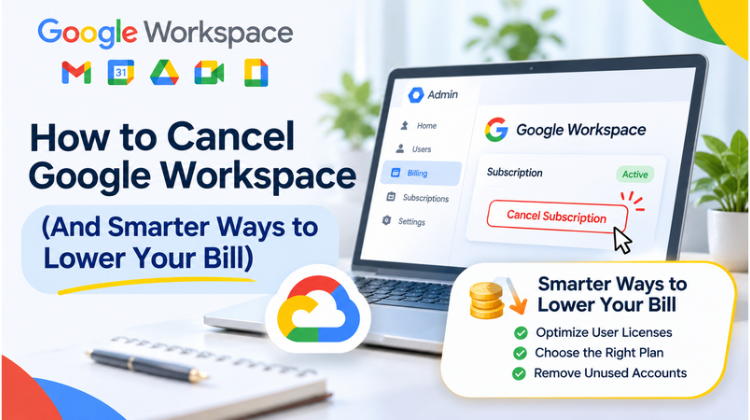
Click Cancel Subscription: At the bottom of the subscription details page—or under the More menu—click Cancel Subscription.
Choose Your Cancellation Reason: Google will prompt you to select a reason for leaving (e.g., Cost, Switching providers, or No longer needed). Select the relevant option and click Continue.
Review Data Deletion Warnings: Carefully read the acknowledgment screen explaining which services will stop immediately and what happens to your organization’s data. Check the confirmation box.
Confirm Cancellation: Enter your administrator email address when prompted and click Cancel My Subscription. Save a screenshot of the confirmation screen for your financial records.
Special Case: Purchased Through a Reseller or Website Host
If you bought your licenses through a third-party reseller, domain host (such as GoDaddy, Squarespace, or Wix), or a local cloud partner, you will not see a Cancel Subscription button inside the Google Admin Console. In that scenario, How to Cancel Google Workspace depends on your provider: you must log into your reseller’s billing portal or contact their account support team directly to terminate the subscription before your next renewal date.
Understanding Flexible vs. Annual Plans When You Learn How to Cancel Google Workspace
One of the biggest shocks businesses experience after learning How to Cancel Google Workspace is receiving a final invoice weeks later. Your final bill depends entirely on which payment commitment you selected when signing up.
| Billing Factor | Flexible Plan (Month-to-Month) | Annual / Fixed-Term Plan (1-Year+) |
| Contract Commitment | None; cancel anytime without penalty | 12-month (or multi-year) binding commitment |
| Cancellation Charges | Charged only for the exact days used in the current billing month | Charged 100% of the remaining balance for the contract term |
| Removing Users | Remove licenses anytime; next monthly bill drops automatically | Cannot reduce licenses mid-term; reductions apply only at renewal |
| Refund Policy | Unused prepaid credit balances can be refunded upon request | No refunds for unused months if canceled early |
Why Timing Matters on Annual Contracts
If you are on an Annual/Fixed-Term Plan, canceling mid-year does not save you money—Google still bills your payment method for the remaining months of your one-year commitment. If you are locked into an annual plan, it is smarter to keep using the service you have already paid for, disable auto-renewal under Billing > Subscriptions > Manage renewal options, and schedule your migration closer to your contract expiration date.
6 Smarter Ways to Lower Your Bill Without Full Cancellation
In most cases, companies searching for How to Cancel Google Workspace are not unhappy with Gmail, Drive, or Meet—they are simply frustrated by rising software expenses. Before abandoning a productivity suite your team already knows how to use, consider these six proven ways to cut your Workspace bill by 20% to 50%.
1. Reclaim Unused and Suspended User Licenses
Many organizations unknowingly pay full monthly fees for employees who left months ago. A common misconception is that suspending a user stops billing—Google charges the exact same rate for suspended users as active users.
The Fix: Audit Directory > Users every month. Transfer the Drive files and emails of departed employees to a manager or a shared archive folder, then delete the unused user accounts. On a Flexible Plan, removing 5 inactive Business Standard users immediately saves hundreds of dollars per year.
2. Convert Inactive Accounts to Cloud Identity Free
If you have contractors, former employees whose email addresses still need to receive forwarded messages, or staff who only need single sign-on (SSO) access to internal apps without a full mailbox:
The Fix: Assign them a Cloud Identity Free license instead of a paid Workspace license. You can also set up email aliases (
sales@yourdomain.com,info@yourdomain.com) or Google Groups for shared department inboxes at zero additional license cost.
3. Mix and Match License Editions (Partial Domain Licensing)
Does every single employee in your organization truly need 2 TB of cloud storage, AI features, and automated Meet recordings? Usually, only executives, managers, and heavy content creators require higher-tier plans, while frontline, operations, or support staff only need basic email and calendar access.
The Fix: Ask a Google Cloud Partner about Partial Domain Licensing (Split Licensing). By keeping leadership on Business Standard or Business Plus while moving general staff to Business Starter, businesses routinely cut their overall expenditure by 30% or more.
4. Downgrade Your Subscription Tier
If your team isn’t utilizing advanced security vault features or massive storage pools, downgrading from Business Plus to Business Standard—or from Business Standard to Business Starter—instantly lowers your per-user rate.
Navigate to Billing > Subscriptions, click Upgrade or downgrade, and compare storage usage under Reports > Apps Reports > Accounts first to make sure no user exceeds the 30 GB storage limit of Business Starter.
5. Switch from Flexible Billing to Annual Commitment
If you have a stable core team and are currently paying month-to-month on the Flexible Plan, you are paying a roughly 16% to 20% convenience premium every single month.
The Fix: Move your core, permanent headcount onto an Annual Plan to lock in the lowest per-user rate, while keeping seasonal or temporary staff on flexible terms through an authorized partner.
6. Partner with an Authorized Local Reseller for Better Rates and Tax Compliance
Purchasing directly from Google’s global billing portal often means dealing with international credit card foreign exchange markups, rigid tier structures, and complex tax documentation. When reviewing google workspace pricing in india, working with an authorized local Google Workspace and Google Cloud Partner in Gurgoan, unlocks volume discounts, INR invoicing with full GST input tax credit compliance, and customized license optimization that direct self-serve billing simply does not offer.
What Happens After You Complete How to Cancel Google Workspace?
If you decide that full termination is still the right choice for your business, here is the exact timeline of what occurs once you confirm How to Cancel Google Workspace:
Immediate Effect (Day 0): Your paid Workspace services stop. Users can no longer access custom-domain Gmail, Google Meet, Google Chat, or Calendar.
Admin Console Access: Depending on whether you canceled only the subscription or deleted the entire organization account, you may retain temporary read-only access to the Admin Console to download final invoices or manage your domain settings.
Free Consumer Services: Users can still sign in to their accounts to access basic non-Workspace Google services like YouTube, Google Maps, or Google Ads, provided you did not delete the underlying Google domain account.
Final Settlement Invoice: At the beginning of the following month, Google generates one final invoice covering either your prorated usage days (Flexible Plan) or your remaining contract balance (Annual Plan).
Quick Decision Checklist: Cancel vs. Optimize
Before finalizing How to Cancel Google Workspace, run through this quick five-point decision check:
Have you exported all critical emails and Drive files using Google Takeout or the Admin Data Export tool?
Are you on a Flexible Plan (penalty-free exit) or an Annual Plan (full contract balance due)?
Have you deleted all suspended accounts to see how much your bill drops naturally?
Could downgrading a portion of your team to Business Starter achieve your target budget without migrating emails?
Have you consulted a Google Workspace partner to review split-licensing discounts and localized billing options?
By evaluating these steps carefully, you avoid costly migration headaches and ensure every dollar spent on cloud productivity delivers measurable value to your organization. To know more about How to cancel google workspace, visit official Google Workspace today.
Also Read: Google Workspace Admin Console Tutorial: Essential Security & User Settings
# cancel Google Workspace subscription # Google Workspace billing management # lower Google Workspace bill # Google Workspace Flexible vs Annual plan # Google Workspace data export # Google Workspace partial domain licensing # delete suspended users Google Workspace # Google Workspace downgrade plan # Google Workspace cost optimization # Google Admin Console billing # Google Workspace cancellation policy # Google Workspace refund policy # export Google Workspace emails before canceling # Google Workspace Cloud Identity Free # Google Workspace split licensing # Google Workspace license audit # reduce Google Workspace costs # Google Workspace reseller cancellation # Google Workspace early termination fee # Google Workspace Business Starter vs Standard # Google Workspace transfer ownership # Google Takeout Workspace backup # stop Google Workspace auto renewal # Google Workspace invoice download # Google Workspace MX records migration # Google Workspace subscription management # Google Workspace GST billing India # optimize SaaS spend Google Workspace # Google Workspace account deletion # manage Google Workspace licenses # Google Workspace domain ownership # Google Workspace renewal options # Google Workspace enterprise discounts
FAQ
1. How do I cancel Google Workspace without losing my business emails and Drive files? To cancel Google Workspace without losing data, sign in to the Google Admin Console as a Super Admin and go to Data > Data import & export > Data export to download a complete archive of your organization’s emails, Drive files, and calendars before canceling. Once your backup is saved locally and your domain’s MX records are pointed to a new email host, go to Billing > Subscriptions and click Cancel Subscription. How to Cancel Google Workspace (And Smarter Ways to Lower Your Bill)
2. Will Google refund my money if I cancel my Google Workspace subscription early? Google does not issue refunds for early cancellation on Annual or Fixed-Term plans; if you cancel before your contract ends, you are still billed for the remaining balance of your commitment. However, if you are on a month-to-month Flexible Plan, you can cancel anytime without penalty and only pay for the exact days used during that billing cycle. How to Cancel Google Workspace (And Smarter Ways to Lower Your Bill)
3. Why am I still being charged for suspended users in Google Workspace? Google Workspace bills equally for both active and suspended user accounts because suspended accounts continue to reserve your license seat and store corporate emails and Drive data. To lower your bill, you must transfer the departing employee’s data to another team member and permanently delete the user account under Directory > Users. How to Cancel Google Workspace (And Smarter Ways to Lower Your Bill)
4. Why should businesses in Gurgaon choose Amyntas Media Works to manage and optimize Google Workspace? Businesses in Gurgaon choose Amyntas Media Works because as an experienced Google Workspace partner, they help companies cut licensing costs through split-licensing, remove unused seats, and configure seamless migrations without data loss. Amyntas Media Works also provides dedicated local technical support, transparent INR billing with full GST compliance, and customized Admin Console security setups tailored for growing enterprises. How to Cancel Google Workspace (And Smarter Ways to Lower Your Bill)
5. How can Amyntas Media Works help lower my existing Google Workspace bill without migrating away? Amyntas Media Works conducts a thorough license and storage audit of your current Google Workspace tenant to identify suspended accounts, over-provisioned tiers, and consolidation opportunities. By implementing partial domain licensing, converting inactive users to free identities, and offering competitive partner pricing in Gurgaon, Amyntas Media Works helps businesses reduce monthly Workspace expenses while keeping their existing emails and workflows intact. How to Cancel Google Workspace (And Smarter Ways to Lower Your Bill)

Exploring the Benefits of Partnering with Google Cloud Migrating to Read more

Reasons to Work with a Google Workspace Partner Every business Read more
Advantages of Google Workspace for Education Google Workspace for Education Read more
As the market evolves, businesses and organizations continually seek robust Read more