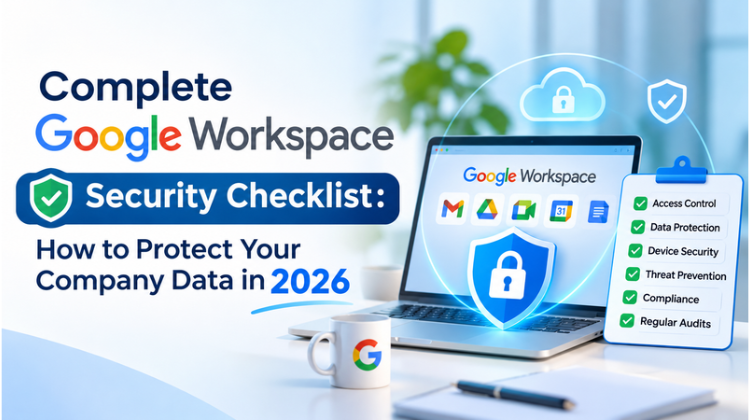
As organizations scale hybrid setups and integrate automated cloud workflows, safeguarding corporate data is paramount. Google Workspace provides enterprise-grade infrastructure out of the box, yet misconfigurations remain the primary trigger for cloud-based security breaches. Implementing a robust Google Workspace Security Checklist ensures that unauthorized account takeovers, internal data leakage, and malicious ransomware attempts are systematically neutralized.
This definitive Google Workspace Security Checklist covers actionable policies across access management, email authentication, data loss prevention, mobile endpoint controls, and continuous audit protocols. Whether operating as an emerging startup or an enterprise, executing this security framework protects organizational assets against modern cyber threats.
1. Identity & Access Management (IAM): The First Line of Defense
Identity management forms the backbone of cloud security. A comprehensive Google Workspace Security Checklist requires enforcing strict authentication rules to eliminate unauthorized account compromises.
       +-------------------------------------------------------+
       |   IDENTITY & ACCESS MANAGEMENT (IAM) ARCHITECTURE     |
       +-------------------------------------------------------+
                                   |
           +-----------------------+-----------------------+
           |                                               |
           v                                               v
+-----------------------+                       +-----------------------+
|  2-Step Verification  |                       | Strict Password Rules |
|  (Enforce Security    |                       | (Length, History &    |
|   Keys / Hardware)    |                       |  No Reuse Policy)     |
+-----------------------+                       +-----------------------+
           |                                               |
           +-----------------------+-----------------------+
                                   |
                                   v
                       +-----------------------+
                       | Zero Trust & RBAC     |
                       | (Least Privilege &    |
                       | Context-Aware Access) |
                       +-----------------------+
Enforce Mandatory 2-Step Verification (2SV) Across All Accounts
Multi-Factor Authentication (MFA) neutralizes over 99% of automated account attacks.
Enforce Security Keys: Deploy FIDO2 hardware security keys or phone-based prompt authentication for high-risk accounts (Super Admins, Finance, C-Suite).
Eliminate Weak Methods: Disable SMS-based verification and voice call codes, which remain vulnerable to SIM swapping attacks.
Define Grace Periods: Establish a mandatory 2SV enforcement window for newly onboarded employees to prevent unprotected account gaps.
Implement Strict Password & Login Policies
Set minimum password lengths (at least 14–16 characters) emphasizing passphrases over complex short strings.
Disable password reuse across account cycles and prevent long-term credential caching.
Utilize Single Sign-On (SSO) integrations via SAML 2.0 to centralize authentication through trusted identity providers.
Restrict Super Admin Privileges via Role-Based Access Control (RBAC)
Apply the Principle of Least Privilege (PoLP) by assigning dedicated Custom Admin Roles rather than granting full Super Admin privileges.
Maintain a minimum of two and a maximum of five active Super Admin accounts to prevent single points of failure while minimizing the attack surface.
Enforce dedicated, separate administrative accounts (e.g.,
admin.john@company.com) for management tasks instead of using daily operational emails.
2. Advanced Email Security & Domain Authentication
Email represents the dominant vector for phishing, spear-phishing, and Business Email Compromise (BEC). A complete Google Workspace Security Checklist must secure incoming and outgoing mail transport.
Enforce Complete Email Authentication (SPF, DKIM, DMARC)
Ensure proper DNS configuration to maintain domain reputation and prevent unauthorized brand impersonation:
SPF Setup: Specify Google’s mail servers (
v=spf1 include:_spf.google.com ~all) along with verified third-party sending services.DKIM Signing: Generate 2048-bit DKIM keys inside the Google Admin Console and publish the TXT records to your DNS authority.
DMARC Policy Enforcement: Move progressively from monitoring (
p=none) to quarantine (p=quarantine) and ultimately to complete rejection (p=reject) with automated RUA/RUF reporting.
Configure Advanced Phishing and Malware Protection
Within the Google Admin Console under Apps > Google Workspace > Gmail > Safety, activate high-grade protection rules:
Enable protection against spoofing of domain names and employee names.
Quarantine incoming emails displaying suspicious attachments, unauthenticated domain origins, or encrypted scripts.
Enable Enhanced Pre-Delivery Scanning to execute deep inspection on incoming attachments prior to user inbox delivery.
Enforce BIMI (Brand Indicators for Message Identification) to attach verified brand logos to legitimate outbound emails, increasing receiver trust.
3. Data Loss Prevention (DLP) & Drive Sharing Controls
Data leaks often originate from accidental internal oversights. An effective Google Workspace Security Checklist outlines granular controls for file storage and external sharing.
                  +-----------------------------------+
                  | GOOGLE DRIVE SECURITY BOUNDARY    |
                  +-----------------------------------+
                                    |
          +-------------------------+-------------------------+
          |                                                   |
          v                                                   v
+------------------------------------+   +------------------------------------+
| External Sharing Controls          |   | Automated Data Loss Prevention     |
| - Block Public Link Access         |   | - Scan Files for PII / PCI Data    |
| - Restrict Domain-to-Domain Links  |   | - Real-time Sharing Block Rules    |
| - Disable Downloading & Printing   |   | - Flag High-Risk Content Alerts    |
+------------------------------------+   +------------------------------------+
          |                                                   |
          +-------------------------+-------------------------+
                                    |
                                    v
                  +-----------------------------------+
                  | Secure Shared Drives              |
                  | - Restricted External Access      |
                  | - Organizational Unit (OU) Rules  |
                  +-----------------------------------+
Restrict External Google Drive File Sharing
Disable public link sharing (“Anyone with the link can view”).
Restrict external file sharing exclusively to whitelisted, trusted target domains.
Enforce a default restriction preventing Viewers and Commenters from downloading, printing, or copying files containing sensitive intellectual property.
Automatically revoke external access privileges after a defined expiration timeframe (e.g., 30 days).
Deploy Automated Data Loss Prevention (DLP) Rules
Construct automated scanning rules targeting Personally Identifiable Information (PII), payment card industry data (PCI-DSS), financial records, and confidential credentials.
Configure DLP actions to automatically warn users, block external sharing attempts, or alert IT administrators when violations occur.
Restrict Google Form submissions from requesting sensitive credential formats or unverified external file uploads.
Structure Organizational Units (OUs) & Shared Drives
Avoid storing primary business data inside personal employee drives; transition assets into centrally managed Shared Drives.
Limit Shared Drive administrative rights so that project members cannot alter root security configurations or move sensitive items to unmanaged locations.
Implement custom trust rules tailored to distinct Organizational Units (OUs) to enforce strict controls on sensitive departments like Finance and HR.
4. Endpoint Management & Mobile Security Controls
As remote and hybrid work models expand, managing mobile devices and laptops accessing cloud data forms a critical component of any Google Workspace Security Checklist.
                   +----------------------------------+
                   | ENDPOINT MANAGEMENT & SECURITY   |
                   +----------------------------------+
                                    |
         +--------------------------+--------------------------+
         |                                                     |
         v                                                     v
+----------------------------------+         +----------------------------------+
| Mobile Device Management (MDM)   |         | Context-Aware Access (CAA)       |
| - Mandatory Device Encryption    |         | - Verify Device Compliance       |
| - Remote Data Wipe Controls      |         | - Location & IP Whitelisting     |
| - Screen Lock & Passcode Rules   |         | - OS Version Enforcements        |
+----------------------------------+         +----------------------------------+
Enforce Google Endpoint Management (MDM)
Advanced Mobile Management: Require employee devices (iOS & Android) to register under corporate management before accessing company data.
Mandatory Screen Locks: Enforce minimum 6-digit numeric passcodes or biometric authentication across managed devices.
Device Encryption: Require disk-level encryption for all connected mobile devices and laptops.
Selective Remote Wipe: Configure capabilities to remotely wipe corporate data from lost, stolen, or compromised devices without altering personal user data.
Implement Context-Aware Access (CAA) Rules
Context-Aware Access enables Zero Trust security architecture by validating user context during login attempts:
Block access to Google Workspace apps if the user operates an outdated, unpatched operating system.
Restrict sensitive Admin Console access to designated corporate IP subnets or verified corporate networks.
Mandate compliance checks verifying that endpoint security tools remain active before granting file access.
5. Third-Party App Management & API Governance
Unchecked third-party OAuth integrations present backdoor entry points into company environments. This section of the Google Workspace Security Checklist mitigates risks associated with malicious or vulnerable cloud extensions.
Audit and Restrict OAuth API Access
Periodically audit third-party applications connected to your workspace environment via Security > Access and data control > API controls.
Set baseline policies to Block all unconfigured third-party apps from accessing Google Workspace data.
Limit API access levels for high-risk scopes (e.g., full Gmail read/write permissions or complete Google Drive modification rights).
Whitelist Only Vetted Google Workspace Marketplace Apps
Restrict individual employees from installing unapproved add-ons directly from the Marketplace.
Maintain an internal IT-approved Marketplace whitelist containing vetted applications that meet organization-wide compliance standards.
Conduct semi-annual reviews of granted scopes for existing integrations to revoke permissions from inactive software providers.
6. Continuous Monitoring, Auditing & Incident Response
A static security configuration requires ongoing maintenance. The final phase of our Google Workspace Security Checklist focuses on continuous visibility, threat detection, and incident remediation.
       +-------------------------------------------------------+
       |   CONTINUOUS AUDITING & THREAT INCIDENT LIFECYCLE     |
       +-------------------------------------------------------+
                                   |
           +-----------------------+-----------------------+
           |                                               |
           v                                               v
+-----------------------+                       +-----------------------+
| Real-time Alerts      |                       | Google Vault          |
| - Security Center     |                       | - Legal Holds &       |
| - Suspicious Logins   |                       |   Retention Rules     |
| - DLP Violations      |                       | - Audit Trail Storage |
+-----------------------+                       +-----------------------+
           |                                               |
           +-----------------------+-----------------------+
                                   |
                                   v
                       +-----------------------+
                       | Investigation Tool    |
                       | - Automated Remediation|
                       | - Account Suspensions |
                       | - Mass File Recovery  |
                       +-----------------------+
Configure Real-Time Alert Center Notifications
Enable immediate email notifications for critical operational events:
Suspicious login attempts and impossible travel triggers.
Creation or modification of Super Admin permissions.
Password changes for privileged accounts.
Device compromise detections and primary DNS modification alerts.
Leverage Google Workspace Security Center & Investigation Tool
Conduct weekly audits using the Security Health Page inside the Admin Console to track security compliance posture.
Utilize the Security Investigation Tool to search audit logs for compromised email threads, revoke public file shares at scale, and quarantine malicious messages across all user inboxes.
Export log records to external Security Information and Event Management (SIEM) systems (e.g., Google Chronicle, Splunk, Microsoft Sentinel) for centralized enterprise logging.
Enforce Data Retention via Google Vault
Set up retention rules across Gmail, Drive, Chat, and Meet records to fulfill regulatory compliance mandates (e.g., HIPAA, ISO 27001, GDPR).
Place immediate Legal Holds on accounts involved in litigation or internal investigations to prevent data destruction.
Ensure comprehensive user offboarding procedures are documented, including account suspension, license transfer, and data archive retention.
Master Google Workspace Security Checklist: 2026 Audit Matrix
Review this summary matrix to audit your operational readiness against the full Google Workspace Security Checklist:
Also Read: Essential Google Workspace Security Setup for SMBs: SPF, DKIM & DMARC Protocols
#Google Workspace Security #Cloud Data Protection #Google Workspace Admin #Cyber Security 2026 #Google Workspace MFA #Email Authentication #SPF #DKIM #DMARC #Data Loss Prevention #DLP #Google Drive Security #Endpoint Management #Mobile Device Management #Zero Trust Architecture #OAuth Security #Context Aware Access #Google Vault #Information Security #Google Cloud Partner #Google Workspace Reseller #Amyntas Media Works #IT Infrastructure #Gurgaon Tech Services #Email Migration #Phishing Protection #Cloud Compliance #Google Workspace Setup #Google Security Audit #Business Email Security #Cloud Migration Gurgaon #Enterprise Data Protection
FAQ
1: What are the most critical steps in a 2026 Google Workspace Security Checklist for small to medium businesses?
Answer:
The most critical steps in a Google Workspace Security Checklist involve:
Enforcing mandatory 2-Step Verification (2SV) using security keys or phone prompts.
Implementing complete email authentication standards (SPF, DKIM, and DMARC with a
p=rejectpolicy) to eliminate domain spoofing.Restricting external file sharing on Google Drive and deploying Data Loss Prevention (DLP) rules.
Enforcing Endpoint Management for mobile devices accessing business data.
Blocking unvetted third-party OAuth applications from reading company emails or drive files. For more information on Complete Google Workspace Security Checklist : How to Protect Your Company Data in 2026, Contact us today!
2: Why should businesses in Delhi NCR partner with a certified reseller like Amyntas Media Works in Gurgaon for Google Workspace deployment?
Answer:
Partnering with a certified reseller like Amyntas Media Works (based in Sector 48, Gurgaon) provides significant strategic advantages over buying directly from Google:
Localized Expertise & Consultation: Direct access to certified Google Cloud engineers for custom security configuration, zero-downtime data migration, and cloud strategy.
Flexible Commercial Terms: Local INR invoicing with full GST compliance, along with competitive pricing structures and partner discounts.
24/7 Dedicated Technical Support: Immediate resolution of critical IT tickets without dealing with delayed global queue systems.
End-to-End Managed Services: Comprehensive handling of domain configuration, user onboarding, security enforcement, and employee cloud training.For more information on Complete Google Workspace Security Checklist : How to Protect Your Company Data in 2026, Contact us today!
3: How does Amyntas Media Works assist companies in executing a complete Google Workspace Security Checklist audit?
Answer:
Amyntas Media Works provides hands-on technical audits tailored to an organization’s security posture. Their certified engineers:
Conduct complete security audits of Admin Console settings, identity rules, and access permissions.
Configure email security protocols (SPF, DKIM, DMARC, BIMI) to ensure inbox deliverability and prevent domain hijacking.
Set up custom Data Loss Prevention (DLP) policies and Context-Aware Access rules tailored to compliance needs.
Deliver complete employee security awareness training to reduce phishing vulnerabilities across the workforce. For more information on Complete Google Workspace Security Checklist : How to Protect Your Company Data in 2026, Contact us today!
4: How can a company migrate legacy email systems to Google Workspace securely without experiencing downtime?
Answer:
A secure, zero-downtime email migration requires careful dual-delivery planning, domain validation, and data encryption. Amyntas Media Works executes migrations through a structured process:
Pre-migration assessment and provisioning of staging environments.
Configuring split or dual-delivery routing to process messages across old and new infrastructure seamlessly.
Utilizing encrypted Data Migration Services (DMS) to transfer historical emails, contacts, and calendar schedules.
Performing DNS cutovers (MX record updates) and immediately enforcing the Google Workspace Security Checklist upon deployment. For more information on Complete Google Workspace Security Checklist : How to Protect Your Company Data in 2026, Contact us today!
5: What makes Amyntas Media Works a top-rated Google Cloud Partner in Gurgaon, Haryana?
Answer:
Amyntas Media Works (located at JMD Megapolis, Sohna Road, Sector 48, Gurgaon) stands out as a leading Premier Google Workspace Reseller and Cloud Partner in India due to:
Over 13 years of enterprise experience across cloud deployment, IT modernization, web development, and digital security.
A proven track record assisting startups, SMEs, and enterprises throughout India and internationally.
Comprehensive multi-cloud capabilities spanning Google Workspace licensing, Google Cloud Platform (GCP) credits, security integrations, and domain setups.
Consistently high customer satisfaction ratings backed by active 24/7 support channels. For more information on Complete Google Workspace Security Checklist : How to Protect Your Company Data in 2026, Contact us today!
Exploring the Benefits of Partnering with Google Cloud Migrating to Read more

Reasons to Work with a Google Workspace Partner Every business Read more
Advantages of Google Workspace for Education Google Workspace for Education Read more
As the market evolves, businesses and organizations continually seek robust Read more