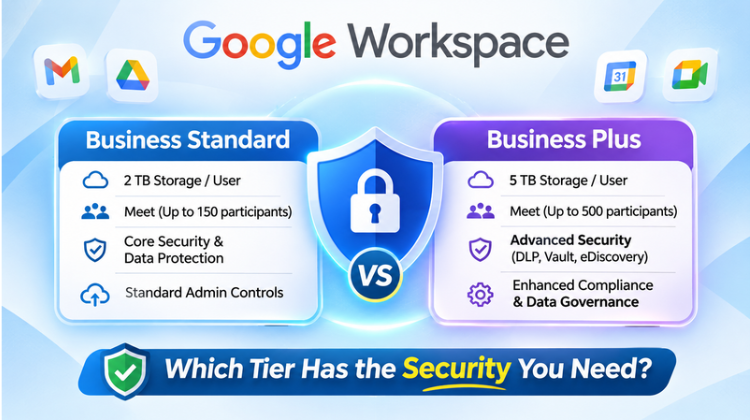
Selecting the optimal cloud productivity platform requires balancing cost efficiency, storage scalability, and robust cybersecurity protocols. As organizations evaluate their IT infrastructure, comparing Google Workspace Business Standard vs Business Plus becomes a strategic imperative. Both tiers provide access to productivity applications—including Gmail, Google Docs, Sheets, Slides, and Google Meet—along with built-in Gemini AI features. However, their underlying security architectures, storage pools, legal retention tools, and endpoint management capabilities differ significantly.
Evaluating Google Workspace Business Standard vs Business Plus requires assessing your organization’s compliance mandates, mobile workforce risks, regulatory requirements, and legal hold obligations. This comprehensive analysis breaks down the core features, security protocols, storage structures, and administrative controls of both tiers to help IT decision-makers choose the right edition.
1. Feature Comparison: Google Workspace Business Standard vs Business Plus
To evaluate Google Workspace Business Standard vs Business Plus, IT teams must examine storage quotas, meeting capacities, legal archiving tools, and device security policies. While both tiers support up to 300 users per domain, the infrastructure capabilities beneath the hood vary.
                     +---------------------------------------+
                     |   TIER SELECTION DECISION MATRIX      |
                     +---------------------------------------+
                                         |
            +----------------------------+----------------------------+
            |                                                         |
            v                                                         v
+-----------------------+                                 +-----------------------+
|  BUSINESS STANDARD    |                                 |     BUSINESS PLUS     |
+-----------------------+                                 +-----------------------+
| - 2 TB Pooled Storage |                                 | - 5 TB Pooled Storage |
| - 150-User Meetings   |                                 | - 500-User Meetings   |
| - Standard MDM        |                                 | - Advanced MDM        |
| - Shared Drives Access|                                 | - Google Vault &      |
|                       |                                 |   eDiscovery          |
+-----------------------+                                 +-----------------------+
            |                                                         |
            v                                                         v
+-----------------------+                                 +-----------------------+
| Best for: Growing     |                                 | Best for: Regulated   |
| SMBs with Standard    |                                 | Enterprises, Legal,   |
| Collaboration Needs   |                                 | Finance & Remote Teams|
+-----------------------+                                 +-----------------------+
Core Architecture & Technical Specifications
| Feature / Capability | Google Workspace Business Standard | Google Workspace Business Plus |
| Maximum User Cap | Up to 300 users | Up to 300 users |
| Pooled Cloud Storage | 2 TB per user (Pooled) | 5 TB per user (Pooled) |
| Google Meet Capacity | Up to 150 participants | Up to 500 participants |
| Meeting Recording & Transcripts | Included (Saved to Drive) | Included (Saved to Drive) |
| Meeting Attendance Tracking | Not Included | Included (Automated Reports) |
| Google Vault (eDiscovery) | Not Included | Included (Full Retention Rules) |
| Endpoint Management | Fundamental MDM Controls | Advanced MDM & Device Certificates |
| Shared Drives | Included (Advanced Permissions) | Included (Advanced Permissions) |
| Audit Logs & Analytics | Standard Admin Reports | Enhanced Audit & Reporting Logs |
2. Security Infrastructure: Comparing Business Standard vs Business Plus
Security controls mark the primary point of divergence when evaluating Google Workspace Business Standard vs Business Plus. Understanding these security layers ensures your company data remains protected against unauthorized access, internal data leakage, and external threat vectors.
       +-------------------------------------------------------+
       |     SECURITY & COMPLIANCE STACK ARCHITECTURE          |
       +-------------------------------------------------------+
                                   |
           +-----------------------+-----------------------+
           |                                               |
           v                                               v
+-----------------------+                       +-----------------------+
|  BUSINESS STANDARD    |                       |     BUSINESS PLUS     |
+-----------------------+                       +-----------------------+
| - Mandatory 2SV       |                       | - Everything in       |
| - SPF, DKIM, DMARC    |                       |   Business Standard   |
| - Fundamental MDM     |                       | - Google Vault        |
| - Password Policies   |                       |   (Legal Holds)       |
| - Basic File Sharing  |                       | - Advanced MDM        |
|   Restrictions        |                       | - Device Certificates |
|                       |                       | - Enhanced Audit Logs |
+-----------------------+                       +-----------------------+
Identity & Authentication Policies
Both plans include core Identity & Access Management (IAM) protections:
2-Step Verification (2SV): Enforce mandatory 2SV across all user accounts using security prompts, hardware keys (FIDO2), or authenticator apps.
Single Sign-On (SSO): Integration via SAML 2.0 to centralize corporate authentication across third-party applications.
Password Governance: Customize minimum length, complexity parameters, and password reset intervals across specific Organizational Units (OUs).
Google Vault & eDiscovery Compliance
The inclusion of Google Vault represents a critical security distinction in Google Workspace Business Standard vs Business Plus:
Business Standard: Lacks Google Vault capabilities. Organizations facing legal disputes, regulatory compliance audits, or strict recordkeeping rules cannot enforce automated retention or eDiscovery holds.
Business Plus: Includes Google Vault natively. Administrators can set retain-and-hold rules for Gmail messages, Google Drive files, Google Chat logs, and Meet recordings. Even if an employee permanently deletes a file or email from their trash, Vault retains the immutable record for legal search and export.
Mobile Device Management (MDM) & Endpoint Controls
Securing hardware endpoints accessing cloud data requires evaluating mobile device policies in Google Workspace Business Standard vs Business Plus:
Business Standard (Fundamental Endpoint Management)
Enforces passcode requirements and basic screen locks on mobile devices.
Allows administrators to wipe user accounts remotely if a device is lost.
Requires manual approval for new device connections without granular security profiling.
Business Plus (Advanced Endpoint Management)
Selective Remote Wipe: Wipe corporate profile data from bring-your-own-device (BYOD) hardware while leaving personal data untouched.
Device Blocking & Certificates: Mandate corporate security certificates before permitting access to company networks and Workspace services.
Automated Device Rules: Block non-compliant devices automatically if operating system versions fall behind minimum security patch levels.
Windows & macOS Management: Push custom security policies, track hardware inventory, and enforce disk encryption settings across desktop platforms centrally.
3. Storage Allocation & File Governance Analysis
Data storage structure represents another key factor when deciding between Google Workspace Business Standard vs Business Plus.
                 +-----------------------------------+
                 | POOLED STORAGE CAPACITY MODEL     |
                 +-----------------------------------+
                                   |
         +-------------------------+-------------------------+
         |                                                   |
         v                                                   v
+----------------------------------+   +----------------------------------+
| BUSINESS STANDARD                |   | BUSINESS PLUS                    |
| - 2 TB Pooled per User           |   | - 5 TB Pooled per User           |
| - Example (50 Users): 100 TB     |   | - Example (50 Users): 250 TB     |
| - Centralized Shared Drives      |   | - Centralized Shared Drives      |
+----------------------------------+   +----------------------------------+
Pooled Storage Dynamics
Both editions utilize pooled storage architecture, meaning total domain storage equals the per-user allocation multiplied by total active licenses:
Business Standard (2 TB per user): A 50-user domain receives a shared capacity pool of 100 TB. Heavy storage users can draw from unused capacity allocated to lower-usage accounts.
Business Plus (5 TB per user): A 50-user domain receives a shared capacity pool of 250 TB. This tier accommodates high-resolution media creation, enterprise database backups, and long-term video call recording archives.
Shared Drives & Organizational File Ownership
Both Business Standard and Business Plus provide full access to Shared Drives. Unlike individual Google Drive spaces where files belong to individual employee accounts, files in Shared Drives are owned by the organization. When an employee leaves the company, project assets stored in Shared Drives remain intact without requiring complex manual data transfers.
4. Administrative Controls & Audit Logging Capabilities
Maintaining organizational oversight requires inspecting admin console capabilities in Google Workspace Business Standard vs Business Plus.
       +-------------------------------------------------------+
       |   ADMINISTRATIVE CONTROL & AUDIT LOGGING LIFECYCLE    |
       +-------------------------------------------------------+
                                   |
           +-----------------------+-----------------------+
           |                                               |
           v                                               v
+-----------------------+                       +-----------------------+
|  BUSINESS STANDARD    |                       |     BUSINESS PLUS     |
+-----------------------+                       +-----------------------+
| - Standard System     |                       | - Advanced Admin Audit|
|   Alerts              |                       |   Log System          |
| - Security Health     |                       | - Attendance Log      |
|   Dashboard           |                       |   Exports             |
| - User OU Management  |                       | - Custom Incident     |
|                       |                       |   Trigger Alerts      |
+-----------------------+                       +-----------------------+
Reporting & Audit Trails
Business Standard: Provides core admin logging for login events, password modifications, drive file creation, and admin privilege changes.
Business Plus: Delivers granular reporting, including Google Meet attendance tracking reports (names, emails, join times, leave times), advanced mobile device compliance logs, and enhanced security audit exports.
Security Health Monitoring
Both plans include the Google Admin Console Security Health page, allowing administrators to review domain configurations, evaluate password policies, inspect external file sharing settings, and audit admin privileges against security baselines.
5. Total Cost of Ownership (TCO) & License Optimization
Selecting between Google Workspace Business Standard vs Business Plus requires balancing operational capabilities against overall software licensing budgets.
Commercial Cost Structure
Business Standard: Billed at standard pricing tiers ($14 USD / user / month on annual commitment). Ideal for organizations requiring high cloud storage, meeting recording capabilities, and team collaboration features without regulatory archiving requirements.
Business Plus: Billed at elevated security tiers ($22 USD / user / month on annual commitment). The price difference is often offset by eliminating standalone external subscriptions for third-party email archiving, legal hold software, advanced MDM suites, and high-capacity webinar tools.
Hybrid Licensing Considerations
Google Workspace allows businesses to mix and match license tiers within the same domain under specific reseller agreements. For instance, an organization can assign Business Plus licenses to executives, legal counsel, and IT administrators needing Google Vault and advanced MDM, while assigning Business Standard to general operational staff, optimizing overall TCO.
Master Comparison Matrix: Business Standard vs Business Plus
Use this reference matrix to evaluate Google Workspace Business Standard vs Business Plus against your specific business requirements:
| Operational Parameter | Business Standard | Business Plus | Best Fit Tier |
| Cloud Storage per User | 2 TB (Pooled) | 5 TB (Pooled) | Business Plus for heavy media environments |
| Max Google Meet Size | 150 Participants | 500 Participants | Business Plus for enterprise town halls |
| Meeting Recording | Yes (Saved to Drive) | Yes (Saved to Drive) | Tie |
| Attendance Tracking | No | Yes (Automated CSV Reports) | Business Plus for compliance/webinars |
| Google Vault (eDiscovery) | No | Yes (Emails, Drive, Chats, Meets) | Business Plus for regulated industries |
| Mobile Security (MDM) | Fundamental Controls | Advanced MDM & Certificates | Business Plus for BYOD & remote teams |
| Shared Drives | Included | Included | Tie |
| Max User Limit | 300 Users | 300 Users | Tie |
| Target Audience | Growing SMBs | Regulated Enterprises / Legal | Varies by compliance need |
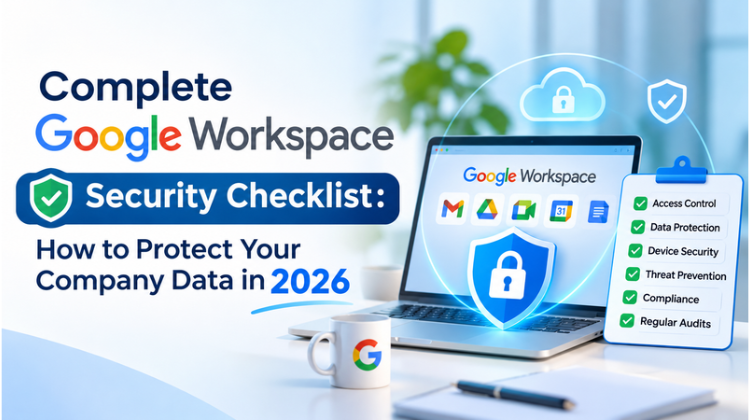
Also Read: Complete Google Workspace Security Checklist : How to Protect Your Company Data in 2026
#Google Workspace Business Standard vs Business Plus #Google Workspace Pricing #Google Workspace Security #Google Vault #eDiscovery #Business Standard vs Plus #Google Workspace Reseller #Cloud Storage Comparison #Google Workspace India #Amyntas Media Works #Gurgaon IT Services #Google Workspace Admin #Mobile Device Management #Advanced MDM #Data Retention #Google Meet Limits #Shared Drives #Google Workspace Migration #Cloud Security India #Google Cloud Partner #Enterprise IT Security #GSuite To Workspace #Google Workspace Features #Delhi NCR Tech Consulting #IT Infrastructure #Cloud Compliance #Google Workspace Licenses #Google Workspace Upgrade #Secure Cloud Storage #Business Email Setup #Google Workspace Reseller Gurgaon #Workspace Security Audit
FAQ
Question 1: What is the main security difference between Google Workspace Business Standard vs Business Plus?
Answer:
The primary security difference between Google Workspace Business Standard vs Business Plus centers on Google Vault and Advanced Endpoint Management:
Business Standard offers fundamental security, including 2-Step Verification, basic mobile management, standard audit logs, and shared drive controls.
Business Plus adds Google Vault for eDiscovery and legal data retention across Gmail, Drive, Chat, and Meet. It also includes Advanced Endpoint Management, allowing IT administrators to enforce device security certificates, execute selective remote wipes on BYOD devices, and automate device compliance policies.
Question 2: Why should businesses in Delhi NCR consult Amyntas Media Works in Gurgaon when deciding between Business Standard vs Business Plus?
Answer:
Consulting with Amyntas Media Works (located in Sector 48, Gurgaon) provides distinct strategic and financial advantages:
Tailored Infrastructure Audit: Certified Google Cloud engineers evaluate your regulatory compliance, storage needs, and security risks to recommend the precise tier mix.
Hybrid Licensing Strategies: Amyntas helps structure hybrid license deployments (mixing Business Standard and Business Plus) to minimize licensing costs without sacrificing security.
Local Invoicing & GST Compliance: Flexible INR billing options with full GST compliance and custom reseller discounts.
Hands-on Implementation: Complete assistance with Google Vault retention policies, Advanced MDM setup, and zero-downtime email migrations.
Question 3: Can a company upgrade from Business Standard to Business Plus later without data loss or service disruption?
Answer:
Yes, upgrading from Business Standard to Business Plus is seamless and involves zero downtime or data loss. The upgrade is managed directly through the Google Admin Console or through your certified partner, Amyntas Media Works. Upon upgrading, existing user data, emails, and drive files remain intact while unlocking advanced capabilities—such as Google Vault archiving, expanded 5 TB storage pools, and 500-participant Google Meet sessions—instantly across assigned user accounts.
Question 4: Is Google Vault included in Google Workspace Business Standard, or is Business Plus required for legal compliance?
Answer:
Google Vault is not included in Google Workspace Business Standard. To access Google Vault for eDiscovery, litigation holds, automated data retention, and audit exports, organizations must subscribe to Google Workspace Business Plus or an Enterprise tier. If your business operates in healthcare, finance, legal, or other regulated sectors requiring mandatory email retention, Business Plus is the minimum required edition.
Question 5: How does Amyntas Media Works support ongoing Google Workspace management for enterprises in Gurgaon and NCR?
Answer:
Amyntas Media Works acts as an extended IT partner for businesses, providing full-lifecycle Google Workspace management:
24/7 Dedicated Support: Direct line access to certified IT specialists for issue resolution without waiting in global ticket queues.
Security & Compliance Audits: Regular audits of Admin Console settings, DLP configurations, and mobile security enforcement.
User Onboarding & Offboarding: Automated account creation, license provisioning, and secure offboarding procedures to prevent data leakage during employee exits.
Cloud Architecture Expansion: Seamless integration between Google Workspace and broader cloud infrastructure, including Google Cloud Platform (GCP) and third-party security applications.

Exploring the Benefits of Partnering with Google Cloud Migrating to Read more

Reasons to Work with a Google Workspace Partner Every business Read more
Advantages of Google Workspace for Education Google Workspace for Education Read more
As the market evolves, businesses and organizations continually seek robust Read more