In today’s digital landscape, businesses rely heavily on cloud solutions to drive operational efficiency, maintain remote collaboration, and scale infrastructure seamlessly. When evaluating cloud technologies offered by tech giant Google, organizations frequently run into two major flagship brand offerings: Google Cloud Platform (GCP) and Google Workspace. Because both services share the overarching “Google Cloud” parent umbrella, many IT decision-makers, startup founders, and enterprise managers wonder how they differ, whether their capabilities overlap, and how to structure their deployments effectively.
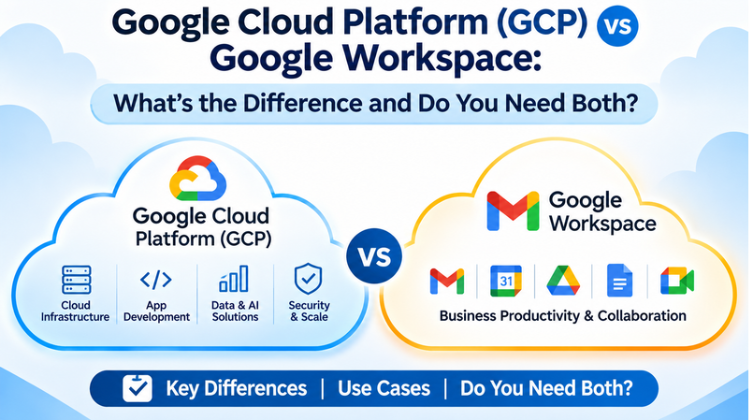
Understanding the technical and functional breakdown of Google Cloud Platform (GCP) vs Google Workspace is critical for making informed technology investments. While both platforms operate on Google’s secure global infrastructure, they serve completely distinct operational mandates. One is an Infrastructure-as-a-Service (IaaS) and Platform-as-a-Service (PaaS) public cloud environment designed for developers, system engineers, and data scientists. The other is a Software-as-a-Service (SaaS) productivity suite built for everyday business communication, document collaboration, and administrative management.
This comprehensive guide breaks down the core architecture, pricing models, security controls, and integration workflows of Google Cloud Platform (GCP) vs Google Workspace to help you determine which platform your organization requires—or whether running both creates the ultimate cloud ecosystem.
Understanding Google Cloud Platform (GCP) vs Google Workspace: High-Level Overview
To appreciate the differences between these two systems, it is essential to categorize them by their cloud service delivery models: Infrastructure (IaaS/PaaS) versus Software (SaaS).
+------------------------------------------------------------------------------------+
|                         GOOGLE CLOUD ENTERPRISE ECOSYSTEM                          |
+------------------------------------------+-----------------------------------------+
|      GOOGLE CLOUD PLATFORM (GCP)         |            GOOGLE WORKSPACE             |
|        (IaaS / PaaS Framework)           |             (SaaS Suite)                |
+------------------------------------------+-----------------------------------------+
| • Virtual Machines & Compute Engine      | • Gmail for Business Custom Domain      |
| • BigQuery Data Warehousing & Analytics  | • Google Drive, Docs, Sheets, & Slides  |
| • Kubernetes Engine (GKE) Containers     | • Google Meet & Google Chat             |
| • Vertex AI & Machine Learning Tools     | • Google Calendar & Forms               |
| • Cloud Storage & SQL Databases          | • Admin Console & Endpoint Management   |
+------------------------------------------+-----------------------------------------+
What Is Google Cloud Platform (GCP)?
Google Cloud Platform (GCP) is a suite of public cloud computing services offered by Google. It provides developer-facing infrastructure tools, serverless computing environments, storage systems, and advanced artificial intelligence and machine learning pipelines.
GCP enables software engineering teams to build, test, deploy, and scale custom applications over Google’s hyper-scale physical infrastructure. Instead of purchasing physical servers, routing hardware, and maintaining on-premise data centers, enterprise teams rent virtualized compute power, serverless functions, cloud storage buckets, and relational/NoSQL databases directly through GCP.
What Is Google Workspace?
Google Workspace (formerly known as G Suite) is a cloud-native productivity and collaboration platform designed for everyday business end-users. It combines communication tools, document creation apps, and cloud file management under a single administrative domain.
Google Workspace provides organizations with business-class custom email domains (Gmail), real-time collaborative document processing (Google Docs, Sheets, Slides), team video conferencing (Google Meet), organized internal communication (Google Chat), and cloud file storage (Google Drive). It is pre-built software ready for immediate operational deployment without writing code or building IT infrastructure.
Core Differences: Google Cloud Platform (GCP) vs Google Workspace
While both ecosystems draw power from Google’s underlying data centers and identity systems, a side-by-side technical breakdown highlights how Google Cloud Platform (GCP) vs Google Workspace address entirely different business needs.
                           ┌──────────────────────────────┐
                           │   Cloud Operational Focus    │
                           └──────────────┬───────────────┘
                                          │
         ┌────────────────────────────────┴────────────────────────────────┐
         ▼                                                                 ▼
┌─────────────────────────────────┐                       ┌─────────────────────────────────┐
│  Google Cloud Platform (GCP)    │                       │        Google Workspace         │
│  - Building Applications        │                       │  - Running Business Operations  │
│  - Training AI/ML Models        │                       │  - Collaborating on Documents   │
│  - Hosting Big Data Warehouses  │                       │  - Sending Corporate Emails     │
│  - Managing Cloud Infrastructure│                       │  - Managing Team Video Meetings │
└─────────────────────────────────┘                       └─────────────────────────────────┘
1. Target Audience and Primary End-Users
The primary end-users form the most prominent line of separation in Google Cloud Platform (GCP) vs Google Workspace:
GCP Target Audience: Cloud architects, backend software engineers, DevOps specialists, data engineers, database administrators, and cybersecurity analysts. End-users interact with GCP via the Google Cloud Console Command Line Interface (gcloud CLI), REST APIs, or Infrastructure-as-Code (IaC) tools like Terraform.
Google Workspace Target Audience: General corporate employees, knowledge workers, HR managers, sales representatives, operations executives, and administrative staff. End-users interact with intuitive web browsers, mobile apps, and graphic user interfaces requiring zero coding knowledge.
2. Service Architecture (IaaS/PaaS vs. SaaS)
GCP Architecture: Operating primarily as IaaS and PaaS, GCP offers foundational building blocks. If a company wants to host an e-commerce platform, construct an enterprise mobile app, or execute predictive analytics, engineers build the application stack on top of GCP virtual machines (Compute Engine), managed container clusters (Google Kubernetes Engine), or serverless compute tools (Cloud Run).
Google Workspace Architecture: As a fully packaged SaaS platform, Google Workspace requires no software assembly. The infrastructure, application layer, database backend, security patches, and software features are entirely maintained by Google. Organizations simply configure user licenses, establish email routing, and set access permissions.
3. Pricing and Cost Structure Models
Financial mechanics differ fundamentally across Google Cloud Platform (GCP) vs Google Workspace:
GCP Pricing Model: GCP runs on a pay-as-you-go, consumption-based pricing model. Charges accumulate based on exact computing resource utilization—such as gigabytes of data stored, virtual CPU usage per second, network egress bandwidth, or API call volume. Costs fluctuate dynamically based on traffic and system demand.
Google Workspace Pricing Model: Workspace operates on a predictable per-user, per-month subscription model (e.g., Business Starter, Business Standard, Business Plus, or Enterprise tiers). For organizations evaluating google workspace pricing in india, rates scale based on whether teams choose annual commitments or flexible monthly plans, making financial planning straightforward as headcount grows.
Side-by-Side Comparison Matrix
To clarify the architectural differences when evaluating Google Cloud Platform (GCP) vs Google Workspace, the comparative analysis below covers their structural, financial, and operational characteristics:
Deep Dive into Key Services: GCP vs Google Workspace
To see how Google Cloud Platform (GCP) vs Google Workspace work in action, let’s explore their core service modules.
Core Modules within Google Cloud Platform (GCP)
Compute Engine: Infrastructure scalable virtual machines (VMs) running Linux or Windows Server, permitting custom operating system configurations.
Google Kubernetes Engine (GKE): Managed container orchestration environment for deploying microservices applications at scale.
BigQuery: Serverless, highly scalable enterprise data warehouse built for running fast SQL queries across petabytes of operational data.
Cloud Storage: Unstructured object storage divided into Hot, Nearline, Coldline, and Archive tiers for handling application assets, backups, and data lakes.
Vertex AI: Unified artificial intelligence platform for building, training, deploying, and monitoring custom machine learning and generative AI models.
Core Modules within Google Workspace
Gmail for Business: Enterprise custom email hosting (
yourname@yourcompany.com) integrated with advanced spam protection and search.Google Drive: Centralized cloud storage system for organizing documents, sharing files securely, and configuring shared team drives.
Google Docs, Sheets, & Slides: Real-time collaborative document, spreadsheet, and presentation editors featuring live commenting and version tracking.
Google Meet & Chat: Secure video conferencing platforms supporting large meetings, noise cancellation, screen sharing, and continuous team chat rooms.
Google Admin Console: Single centralized administrative portal to enforce security policies, setup multi-factor authentication (MFA), manage mobile devices, and provision accounts.
Integration Synergy: How GCP and Workspace Work Together
Although contrasting Google Cloud Platform (GCP) vs Google Workspace highlights their individual characteristics, they are designed to connect smoothly within an enterprise environment. They share an underlying identity and security ecosystem.
                          ┌──────────────────────────────┐
                          │   Google Cloud Identity      │
                          │   (Unified Authentication)   │
                          └──────────────┬───────────────┘
                                         │
        ┌────────────────────────────────┴────────────────────────────────┐
        ▼                                                                 ▼
┌────────────────────────────────┐                       ┌────────────────────────────────┐
│  Google Cloud Platform (GCP)   │                       │        Google Workspace        │
│  - Service Accounts & IAM      │ ◄── API Integration ──► - Google Apps Script          │
│  - BigQuery Data Pipeline      │                       │ - Connected Sheets Analysis    │
│  - Cloud Identity Sync         │                       │ - Domain Security Rules        │
└────────────────────────────────┘                       └────────────────────────────────┘
1. Google Cloud Identity Integration
At the foundation of both ecosystems sits Google Cloud Identity. Organizations deploying Google Workspace automatically possess a Cloud Identity layer. This enables administrators to use identical user credentials (e.g., employee@company.com) to manage access permissions across both Google Workspace drives and GCP developer environments.
Through unified Identity and Access Management (IAM) controls, IT administrators can apply context-aware access, Single Sign-On (SSO), enforced multi-factor authentication, and centralized user deprovisioning across both environments simultaneously.
2. BigQuery and Connected Sheets
Data analytics illustrates another integration point between the platforms. Business analysts who struggle with large datasets can use Connected Sheets inside Google Workspace to query billions of rows of live enterprise data stored inside Google GCP BigQuery—directly from a standard Google Sheets interface, without writing complex SQL scripts.
3. Automation via Google Apps Script and GCP APIs
Development teams can use Google Apps Script to automate business tasks across Workspace applications while calling GCP serverless functions or Vertex AI translation and vision APIs in the background. For instance, an inbound customer email in Gmail can trigger a GCP Cloud Function that parses attachment data, runs an AI sentiment analysis model, and logs summary metrics back to a Google Sheet.
Do You Need Both GCP and Google Workspace?
When analyzing whether your organization requires Google Cloud Platform (GCP) vs Google Workspace, the answer hinges entirely on your business model, internal technical expertise, and digital roadmap.
+-----------------------------------------------------------------------------------+
|                        ORGANIZATIONAL DECISION FRAMEWORK                          |
+-----------------------------------------------------------------------------------+
| SCENARIO                                  | RECOMMENDED PLATFORM ADOPTION         |
+-------------------------------------------+---------------------------------------+
| Standard Office / Professional Services   | • Google Workspace ONLY               |
| (Needs email, doc sharing, video calls)   |                                       |
+-------------------------------------------+---------------------------------------+
| Software / SaaS / Mobile App Tech Startup | • BOTH Google Workspace AND           |
| (Needs office suite AND app hosting)      |   Google Cloud Platform (GCP)         |
+-------------------------------------------+---------------------------------------+
| Digital Marketing / Data Analytics Agency | • BOTH Google Workspace AND           |
| (Needs Client Drive AND BigQuery/Data)    |   GCP Data Engineering Tools          |
+-------------------------------------------+---------------------------------------+
| On-Premise Legacy Hardware Business       | • Google Cloud Platform (GCP) ONLY    |
| (Migrating data infrastructure only)      |   (If keeping existing email stack)   |
+-----------------------------------------------------------------------------------+
Scenario A: You Only Need Google Workspace
If your company is a professional service firm, law practice, marketing consultancy, or traditional retail brand that does not build custom software, host backend web applications, or perform complex machine learning operations, Google Workspace alone is sufficient. Workspace delivers all necessary tools for modern office management, enterprise communication, and file security.
Scenario B: You Only Need Google Cloud Platform (GCP)
If your engineering department needs to host custom backend applications, manage enterprise databases, or process large data streams, but your organization already relies on another legacy email and office productivity provider (like Microsoft 365 or on-premise Exchange), GCP alone fulfills those infrastructure needs.
Scenario C: You Need Both GCP and Google Workspace
For modern digital businesses, tech startups, SaaS providers, e-commerce brands, and data-driven enterprises, deploying both GCP and Google Workspace provides a balanced solution. Google Workspace powers daily operational collaboration across business teams, while GCP provides the underlying computing muscle, security, and scalability needed to run custom digital products and analytics systems.
#Google Cloud Platform #Google Workspace #GCP vs Workspace #Cloud Computing #IaaS vs SaaS #PaaS vs SaaS #Google Cloud #Cloud Infrastructure #Business Productivity #Gmail For Business #Google Drive For Business #Big Query #Compute Engine #Google Kubernetes Engine #Vertex AI #Cloud Identity #Cloud Migration #Cloud Security #Amyntas Media Works #Gurgaon Cloud Agency #Digital Transformation Gurgaon #IT Infrastructure #Cloud Billing Optimization #Identity And Access Management #Data Warehousing #Google Apps Script #Connected Sheets #Workplace Collaboration #Cloud Deployment #Managed Cloud Services #Delhi NCR Cloud Consultant #Enterprise Cloud Solutions #Google Workspace Pricing In India
FAQ
Q1: What is the primary difference between Google Cloud Platform (GCP) vs Google Workspace?
Answer: The primary difference between Google Cloud Platform (GCP) and Google Workspace lies in their cloud service models and target use cases. GCP is an Infrastructure-as-a-Service (IaaS) and Platform-as-a-Service (PaaS) public cloud environment designed for developers, data engineers, and IT teams to build applications, host databases, run virtual machines, and manage AI models. Google Workspace is a Software-as-a-Service (SaaS) productivity suite built for everyday business end-users to manage company email (Gmail), document collaboration (Docs, Sheets), file storage (Drive), and video meetings (Meet). Google Cloud Platform (GCP) vs Google Workspace: What’s the Difference and Do You Need Both?
Q2: Can I use the same account credentials for both GCP and Google Workspace?
Answer: Yes, you can use the exact same user credentials for both platforms by leveraging Google Cloud Identity. When an organization sets up Google Workspace, it automatically creates an underlying Cloud Identity framework. This unified identity management allows IT administrators to grant or restrict developer access permissions inside the Google Cloud Platform console using the same corporate email addresses (user@company.com) assigned to employees in Google Workspace.Google Cloud Platform (GCP) vs Google Workspace: What’s the Difference and Do You Need Both?
Q3: Why do growing businesses choose Amyntas Media Works in Gurgaon for Google Cloud setup and digital transformation?
Answer: Businesses partner with Amyntas Media Works in Gurgaon for cloud deployment because of their deep expertise in enterprise cloud architecture, digital transformation strategies, and managed cloud services. Amyntas Media Works provides end-to-end guidance for onboarding, migrating, securing, and optimizing both Google Workspace productivity suites and Google Cloud Platform (GCP) infrastructures. Their team in Gurgaon helps brands eliminate unnecessary cloud spending, navigate google workspace pricing in india, configure advanced DLP security rules, implement automated data pipelines, and streamline digital operations. Google Cloud Platform (GCP) vs Google Workspace: What’s the Difference and Do You Need Both?
Q4: Is Google Workspace included for free when purchasing Google Cloud Platform (GCP)?
Answer: No, Google Workspace is not included for free with GCP. While both operate within the Google Cloud family, they maintain entirely separate billing structures. Google Workspace is billed on a per-user, per-month SaaS subscription basis according to selected plan tiers (e.g., Business Starter, Standard, Plus, or Enterprise), aligned with official google workspace pricing in india. Conversely, Google Cloud Platform (GCP) utilizes a metered, consumption-based pay-as-you-go pricing model calculated on actual compute resource utilization, storage usage, network egress, and API queries. Google Cloud Platform (GCP) vs Google Workspace: What’s the Difference and Do You Need Both?
Q5: What customized cloud integration services does Amyntas Media Works deliver for enterprises in Gurgaon?
Answer: Amyntas Media Works delivers comprehensive cloud integration services designed to bridge Google Workspace and GCP ecosystems. Their specialized solutions for Gurgaon-based enterprises include seamless Google Workspace email migration, automated BigQuery data pipeline setup, Google Cloud Identity SSO and Multi-Factor Authentication enforcement, custom Apps Script productivity workflows, GCP cloud infrastructure cost optimization audits, local billing support for google workspace pricing in india, and 24/7 managed cloud security monitoring. Google Cloud Platform (GCP) vs Google Workspace: What’s the Difference and Do You Need Both?
Key Highlights of Amyntas Media Works (Gurgaon)
Established as a premier digital transformation and cloud consulting agency based in Gurgaon, Haryana.
Specializes in end-to-end cloud migration services, transitioning legacy architectures into streamlined Google Workspace and GCP cloud deployments.
Provides expert technical setup and administrative configuration for Google Workspace, ensuring zero downtime during custom domain email transitions.
Offers expert evaluation of google workspace pricing in india to select cost-effective licensing tiers for growing enterprises.
Delivers custom GCP cloud architecture design, including Google Kubernetes Engine (GKE) setups, Cloud Storage setup, and cost-effective serverless environments.
Offers specialized Data Engineering & Business Intelligence services connecting Google Workspace Connected Sheets directly to BigQuery data warehouses.
Implements robust Enterprise Security & Compliance frameworks, including Data Loss Prevention (DLP), Cloud Identity IAM policies, and Zero-Trust access architectures.
Serves as a trusted managed services partner for startups, SMEs, and large enterprise brands across Gurgaon, Delhi NCR, and global markets. Google Cloud Platform (GCP) vs Google Workspace: What’s the Difference and Do You Need Both?
In today’s digital-first healthcare ecosystem, managing vast amounts of patient Read more


Choosing the right digital productivity suite is one of the Read more
In today's cloud-first enterprise environment, corporate data flows constantly across Read more

