In today’s cloud-first enterprise environment, corporate data flows constantly across emails, shared documents, chat channels, and cloud storage drives. While cloud collaboration tools boost organizational productivity, they also introduce significant security exposure if sensitive information is left unprotected. Unauthorized file sharing, accidental attachment dispatches, and credential exposures can compromise intellectual property, customer financial data, and regulatory standing within seconds.
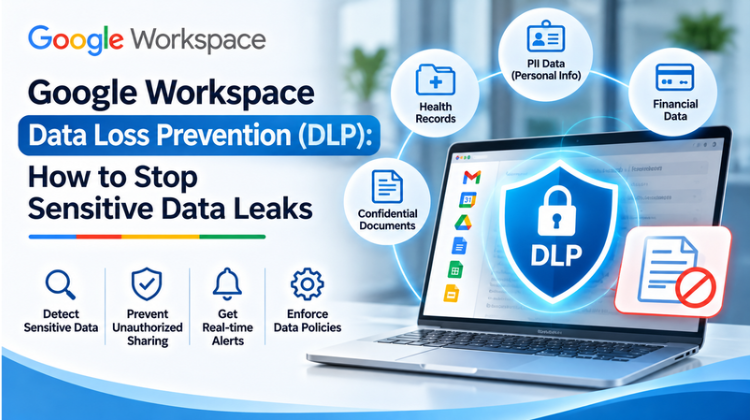
To combat these risks, tech leaders rely on Google Workspace Data Loss Prevention (DLP). Built into Google’s cloud administrative framework, DLP empowers IT security administrators to monitor, detect, and block sensitive data leaks automatically across shared drives, emails, and chat systems.
Whether your organization manages credit card numbers, personally identifiable information (PII), medical records, or proprietary source code, understanding Google Workspace Data Loss Prevention (DLP) is essential for safeguarding modern cloud operations. This guide explores how DLP works, key rules to configure, operational benefits, and strategies to prevent data exposure without disrupting employee workflows.
What Is Google Workspace Data Loss Prevention (DLP)?
Google Workspace Data Loss Prevention (DLP) is an automated cloud security feature that gives enterprise administrators centralized control over how sensitive data is handled across Google Workspace applications, including Google Drive, Docs, Sheets, Slides, Gmail, and Google Chat.
+------------------------------------------------------------------------------------+
|               GOOGLE WORKSPACE DLP DETECTION & MITIGATION FLOW                     |
+------------------------------------------------------------------------------------+
| TRIGGER EVENT       | E.g., User attempts to share document or email externally    |
+---------------------+--------------------------------------------------------------+
| SCAN ENGINE         | Deep Content Inspection (Regex, Optical Character Recognition)|
+---------------------+--------------------------------------------------------------+
| POLICY EVALUATION   | Scans for PII, Credit Cards, Medical Data, API Keys          |
+---------------------+--------------------------------------------------------------+
| AUTOMATED ACTION    | • Block external sharing & warn user                         |
|                     | • Audit & flag incident in Security Command Center           |
|                     | • Apply internal access restriction                          |
+------------------------------------------------------------------------------------+
Instead of relying on manual oversight, Google Workspace Data Loss Prevention (DLP) uses deep content inspection, regular expression (Regex) matching, and predefined detector libraries to scan documents, images, and emails in real time. When a user attempts to share a document containing sensitive information externally, DLP policies intervene to block the action, display a warning, or alert security teams instantly.
Why Google Workspace Data Loss Prevention (DLP) Is Critical for Cloud Security
Modern cloud security requires moving beyond simple perimeter security to a data-centric defense architecture. Implementing Google Workspace Data Loss Prevention (DLP) addresses severe operational and compliance risks.
                        ┌─────────────────────────────────────┐
                        │     MAJOR CLOUD DATA LEAK RISKS     │
                        └──────────────────┬──────────────────┘
                                           │
         ┌─────────────────────────────────┼─────────────────────────────────┐
         ▼                                 ▼                                 ▼
┌─────────────────┐               ┌─────────────────┐               ┌─────────────────┐
│ Accidental External             │ Malicious Data  │               │ Regulatory Non- │
│ Link Sharing    │               │ Exfiltration    │               │ Compliance      │
└────────┬────────┘               └────────┬────────┘               └────────┬────────┘
         │                                 │                                 │
         └─────────────────────────────────┼─────────────────────────────────┘
                                           ▼
                        ┌─────────────────────────────────────┐
                        │   PROTECTED BY GOOGLE WORKSPACE DLP │
                        └─────────────────────────────────────┘
1. Stopping Accidental Internal Data Exposure
Human error causes a vast majority of corporate data breaches. An employee might unintentionally set a Google Drive document link to “Anyone with the link can view” or add an external client email address to a thread containing internal financial projections. Google Workspace Data Loss Prevention (DLP) acts as a safety net, evaluating content before it leaves your domain.
2. Safeguarding Regulatory Compliance Standards
Organizations must comply with strict data protection regulations such as GDPR, HIPAA, PCI-DSS, and local privacy frameworks. Violating these standards can lead to severe fines and legal consequences. Google Workspace Data Loss Prevention (DLP) offers pre-built regulatory detectors that scan for social security numbers, banking details, passport identifiers, and medical records to maintain compliance.
3. Preventing Insider Data Exfiltration
Disgruntled employees or compromised internal accounts can attempt to exfiltrate proprietary code, customer lists, or marketing blueprints. By deploying Google Workspace Data Loss Prevention (DLP) rules, administrators restrict bulk file downloads, block external sharing to personal email accounts, and flag suspicious data movement instantly.
Core Features and Capabilities of Google Workspace Data Loss Prevention (DLP)
Understanding the administrative capabilities of Google Workspace Data Loss Prevention (DLP) helps security teams build effective prevention rules.
| Security Feature | Operational Capability | Business Value |
| Predefined Detectors | 100+ out-of-the-box templates (Credit Cards, Passports, PII) | Immediate compliance coverage with zero custom coding |
| Custom Optical Character Recognition (OCR) | Scans text within uploaded images, PDFs, and scanned receipts | Blocks data leaks hidden within image files |
| Regex & Dictionary Rules | Supports custom regular expressions and custom keyword lists | Protects internal project names, source code, & trade secrets |
| Granular Organizational Unit (OU) Rules | Applies distinct DLP policies to specific departments | Allows flexibility for HR while maintaining strict R&D controls |
| Real-Time Automated Remediation | Blocks shares, warns users, or notifies security teams instantly | Prevents data breaches before external transmission occurs |
| Security Investigation Tool | Centralized audit log tracking all DLP triggers & rule matches | Accelerates forensic analysis & incident investigation |
How Google Workspace Data Loss Prevention (DLP) Operates Across Workspace Apps
Security management requires consistent oversight across all communication channels. Google Workspace Data Loss Prevention (DLP) integrates directly across core Workspace tools.
                           ┌──────────────────────────────┐
                           │  Unified Enterprise Workspace│
                           └──────────────┬───────────────┘
                                          │
         ┌────────────────────────────────┴────────────────────────────────┐
         ▼                                                                 ▼
┌─────────────────────────────────┐                       ┌─────────────────────────────────┐
│        Google Drive & Docs      │                       │         Gmail for Business      │
│ - Real-time file content scan   │                       │ - Outbound attachment analysis  │
│ - External link sharing blocks  │                       │ - Recipient domain validation   │
│ - OCR image text parsing        │                       │ - Automated email quarantining  │
└─────────────────────────────────┘                       └─────────────────────────────────┘
Data Protection in Google Drive, Docs, Sheets, and Slides
Google Drive is often the central repository for enterprise documentation, making it a common source of unintentional data exposure. Google Workspace Data Loss Prevention (DLP) continuously scans files stored in individual and Shared Drives.
When a user updates a document with credit card numbers or sensitive credentials, DLP rules check the file against active security policies. If the document is shared externally, the system can revoke external access, notify the document owner, and log the incident in the Admin Console.
Data Protection in Gmail for Business
Outbound emails present a high-risk vector for data exfiltration. Google Workspace Data Loss Prevention (DLP) integrates with Gmail routing rules to inspect outbound messages and attachments.
If an employee attaches a spreadsheet containing customer PII to an external recipient, DLP can block the email, quarantine the message for administrator review, or strip the sensitive attachment while displaying an explanatory warning to the sender.
Data Protection in Google Chat and Meet
Modern teams collaborate through instant messaging and video chats. DLP extends content scanning to Google Chat, preventing users from pasting confidential API keys, passwords, or customer records into public or external chat spaces.
Step-by-Step Configuration Strategy for Google Workspace Data Loss Prevention (DLP)
Deploying Google Workspace Data Loss Prevention (DLP) requires a structured configuration process to avoid disrupting daily business activities.
+-----------------------------------------------------------------------------------+
|                        5-STAGE DLP DEPLOYMENT METHODOLOGY                         |
+-----------------------------------------------------------------------------------+
| STAGE 1: ASSET INVENTORY   | Identify & classify sensitive data assets             |
+----------------------------+------------------------------------------------------+
| STAGE 2: SCOPE CREATION    | Map rules to specific Organizational Units (OUs)    |
+----------------------------+------------------------------------------------------+
| STAGE 3: DETECTOR SETUP    | Configure Predefined, OCR, & Custom Regex rules       |
+----------------------------+------------------------------------------------------+
| STAGE 4: AUDIT-ONLY MODE   | Test policies in log-only mode to measure impact     |
+----------------------------+------------------------------------------------------+
| STAGE 5: ACTIVE ENFORCE    | Enable active blocking, warnings, & automated alerts  |
+-----------------------------------------------------------------------------------+
Step 1: Conduct a Data Inventory and Risk Assessment
Before enabling blocking rules, identify what sensitive assets exist within your organization. Categorize data into clear groups:
Financial records (bank accounts, credit cards, tax filings)
Personally Identifiable Information (national identity numbers, passports, phone records)
Intellectual property (source code, product designs, trade secrets)
Healthcare records (medical histories, health insurance numbers)
Step 2: Define Organizational Units (OUs) and Access Scopes
Avoid applying blanket policies across the entire organization without scoping. Define specific Organizational Units (OUs) within the Google Workspace Admin Console. For example, your Legal and Finance teams may need controlled external sharing privileges, whereas general staff accounts require stricter outbound DLP boundaries.
Step 3: Configure Predefined and Custom Detectors
Navigate to Security > Data Protection inside the Google Workspace Admin Console. Select from over 100 predefined detectors, or create custom regular expression (Regex) patterns to identify proprietary document formats, internal project codenames, or custom employee IDs.
Step 4: Run Rules in Audit-Only Test Mode First
Deploy new Google Workspace Data Loss Prevention (DLP) rules in Audit-Only Mode before enforcing active blocks. Audit mode logs policy violations without blocking user actions, allowing security administrators to measure rule performance, identify legitimate business workflows, and refine rules to prevent false positives.
Step 5: Enforce Active Actions and End-User Education
Once policies are refined, enable active enforcement actions:
Block External Sharing: Completely prevents sharing outside the domain.
Warn User: Displays an interactive dialog asking the user to confirm whether external sharing is necessary.
Notify Administrator: Triggers immediate alerts via the Security Investigation Tool.
Licensing Requirements and Google Workspace Pricing Context
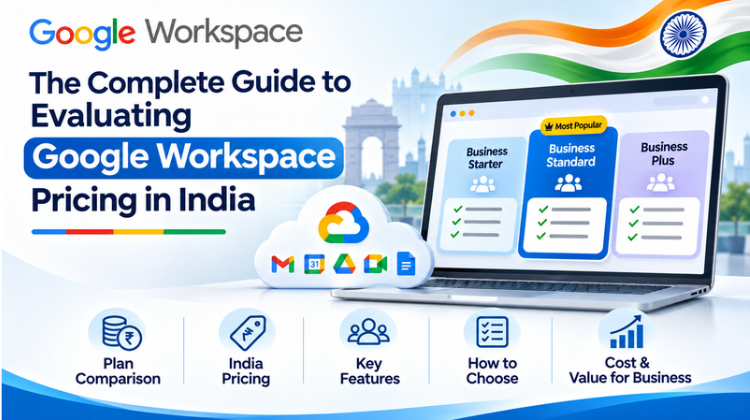
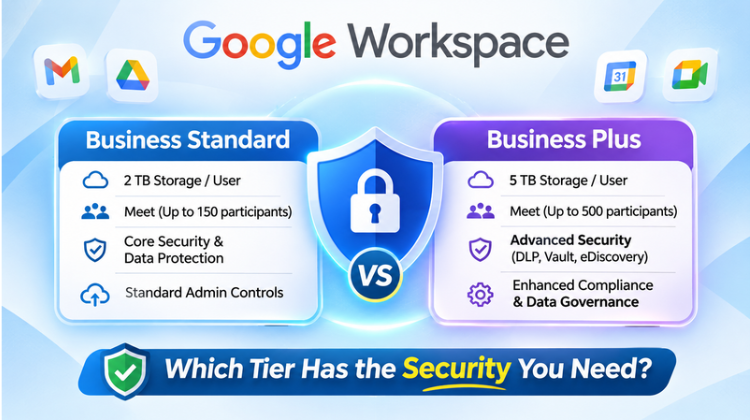
Implementing Google Workspace Data Loss Prevention (DLP) requires specific license tiers. DLP controls for Drive and Gmail are available on higher-tier plans, such as Google Workspace Enterprise Starter, Enterprise Standard, Enterprise Plus, and Education Plus.
For organizations reviewing google workspace pricing in india, upgrading to Enterprise tiers ensures access to advanced security tools like DLP, context-aware access, and the Security Investigation Tool. Evaluating localized pricing in India helps businesses balance security costs against operational budgets.
#Google Workspace DLP #Data Loss Prevention #Google Workspace Security #Cloud Security #Prevent Data Leaks #Google Drive Security #Gmail Security #Data Protection Rules #Information Security #Enterprise Cloud Security #Amyntas Media Works #Gurgaon Cloud Agency #Digital Transformation Gurgaon #Google Workspace Pricing In India #Data Exfiltration Protection #DLP Configuration #Regulatory Compliance #GDPR Compliance #HIPAA Compliance #PCIDSS Security #Cloud Identity #Zero Trust Security #Optical Character Recognition DLP #Regex Security Rules #Google Admin Console #Security Investigation Tool #IT Security Gurgaon #Delhi NCR Cloud Consultant #Managed Security Services #Cloud Data Governance #Cybersecurity Best Practices #Enterprise DLP
FAQ
Q1: How does Google Workspace Data Loss Prevention (DLP) prevent sensitive data leaks?
Answer: Google Workspace Data Loss Prevention (DLP) prevents sensitive data leaks through automated deep content inspection, regular expression (Regex) matching, Optical Character Recognition (OCR), and predefined detector libraries. It continuously scans Google Drive files, Google Docs, Gmail messages, and Google Chat spaces for sensitive data like credit card numbers, PII, and medical records. When a policy violation occurs, DLP automatically blocks external sharing, alerts security teams, or warns the user in real time.
Q2: What Google Workspace plans include Data Loss Prevention (DLP) features?
Answer: Comprehensive Google Workspace Data Loss Prevention (DLP) features are available in higher-tier enterprise subscriptions, including Google Workspace Enterprise Starter, Enterprise Standard, Enterprise Plus, and Education Plus editions. Organizations evaluating google workspace pricing in india can work with certified cloud partners to select cost-effective licensing tiers that include advanced DLP security controls, context-aware access, and centralized security analytics.
Q3: Why do enterprises choose Amyntas Media Works in Gurgaon for Google Workspace DLP setup and security consulting?
Answer: Enterprises partner with Amyntas Media Works in Gurgaon for cloud security deployment because of their technical expertise in cloud infrastructure, cybersecurity, and digital transformation. Amyntas Media Works provides end-to-end guidance for configuring, testing, and optimizing Google Workspace Data Loss Prevention (DLP) rules. Their Gurgaon-based specialists help organizations analyze risk exposures, eliminate false positives, ensure regulatory compliance, navigate google workspace pricing in india, and establish Zero-Trust security architectures.
Q4: Can Google Workspace DLP scan text within images and scanned PDFs?
Answer: Yes, Google Workspace Data Loss Prevention (DLP) includes integrated Optical Character Recognition (OCR) technology. This capability enables the system to scan text embedded inside uploaded images, scanned PDF documents, and image-based receipts, preventing users from bypassing security policies by taking screenshots or uploading scanned documents containing sensitive information.
Q5: What specialized cloud security services does Amyntas Media Works deliver for businesses in Gurgaon?
Answer: Amyntas Media Works provides comprehensive cloud security services for Gurgaon-based enterprises, including custom Google Workspace Data Loss Prevention (DLP) policy development, organizational unit security audits, Google Cloud Identity SSO and Multi-Factor Authentication enforcement, automated BigQuery log analysis, staff security awareness training, local billing management for google workspace pricing in india, and 24/7 incident response monitoring.
Key Highlights of Amyntas Media Works (Gurgaon)
Premier cloud consulting and digital transformation agency based in Gurgaon, Haryana.
Specializes in end-to-end Google Workspace security deployments, including custom DLP rule creation and security command auditing.
Provides expert technical evaluation of google workspace pricing in india to optimize enterprise licensing budgets.
Delivers advanced threat protection, Zero-Trust security design, and Context-Aware Access configurations.
Offers specialized data compliance consulting for GDPR, HIPAA, and local data protection regulations.
Implements automated audit workflows connecting Workspace Security Logs to Google Cloud Platform (GCP) BigQuery.
Trusted managed services partner for startups, mid-market businesses, and enterprise brands across Gurgaon, Delhi NCR, and international markets.

Reasons to Work with a Google Workspace Partner Every business Read more
Advantages of Google Workspace for Education Google Workspace for Education Read more
In the current dynamic digital landscape, "Google" is synonymous with Read more
Formerly known as G Suite and Google Apps, Google Workspace Read more